The Path to Success for Governing AI Agents with Microsoft Entra Agent ID

A blog for all things Azure! Whether you're a developer or IT pro, explore tips, trends, and hands-on guides to optimize and transform your workflow with Microsoft Azure's powerful capabilities. Join me while I learn new features and technologies from code to infrastructure.
Introduction
Most organizations do not wake up one morning and decide to run an agent fleet. It happens in increments. A Copilot appears to summarize meetings. A bot gets introduced to triage requests. A workflow assistant starts opening cases after hours. An autonomous agent begins moving across APIs, files, and approvals with just enough independence to be useful. Then another team builds one. A vendor brings one. A low-code platform makes one easy to publish. Soon enough, you've inadvertently deployed the software equivalent of Talkie Toaster, relentlessly asking your APIs if they'd like any toast, or perhaps a toasted teacake, while consuming valuable resources. What looked like a handful of helpful automation becomes a population of nonhuman actors that sign in, request tokens, call resources, and accumulate access. Before you know it, your tenant is drifting like the Jupiter Mining Corporation ship Red Dwarf, overrun by unmanaged Skutters while the AI effectively operates with the IQ of a PE teacher.
That is exactly why Microsoft Entra Agent ID matters. In preview, and currently available through Microsoft Agent 365 in the Frontier program, it gives organizations a formal identity model for AI agents instead of forcing them into a patchwork of human accounts and long-lived application identities. Microsoft is not just adding a new object type. It is building a governance model around agent identity blueprints, blueprint principals, agent identities, and agent users, then layering sponsorship, access packages, Conditional Access, ID Protection, and monitoring on top.
The practical question, then, is not whether agent identity matters, (spoiler alert: they do) it's how to adopt them successfully without creating new sprawl, new blind spots, and a new category of orphaned access. The best way to think about Microsoft Entra Agent ID is as a path to success. Not a single feature, but a sequence.
The Tikka to Ride: Agent 365 and the Frontier Program
Before we start building our mechanoid empire, let's talk prerequisites. You can't just flip a switch and get Agent ID today—it requires authorization higher than a Space Corps Directive. To get started, your tenant must be part of the Frontier preview program and you have to agree to the Agent 365 terms of service. You also need at least one license of Microsoft 365 Copilot in the tenant to enable Agent 365.
To turn the key, an admin needs to head over to the Microsoft 365 admin center, navigate to Copilot > Settings, find Copilot Frontier under User access, and grant access to the specific users or groups looking to pilot the future.

The Path to Success
Laying the Foundation: The Agent Blueprint Model
The first successful move is to resist the temptation to create agents one by one with ad hoc settings. If you build them like snowflakes, they'll melt into a management puddle—or worse, you'll end up with a Series 4000 mechanoid obsessed with ironing everything in your tenant. Microsoft’s model starts with the agent identity blueprint for a reason. Every agent identity in a tenant is created from a blueprint, and that blueprint defines the shared characteristics of the agent type. Microsoft documents properties such as description, app roles, verified publisher, and authentication-related settings like optional claims as part of that common definition. The blueprint also carries the credentials used to request tokens for the agent identities it creates, which means the authentication model is set at the class-of-agent level rather than reinvented for every instance.
That is where categories, metadata, and auth method become operational decisions instead of afterthoughts. If an organization wants a category for customer support agents, another for finance automation, and another for internal copilots, the blueprint is the right boundary. If you want those categories to carry meaningful metadata about purpose, publisher, capabilities, and expected use, the blueprint is where you set that baseline. If you want the authentication method to align with environment and risk, this is where Microsoft’s guidance becomes especially important. For Azure-hosted agents, managed identity is the strongest production pattern. For other software-hosted agents, federated identity credentials are the modern choice. Certificates and client secrets exist, but Microsoft is clear that they are less aligned with current security best practice.
This matters because standardized provisioning is one of the main governance wins in Agent ID. A blueprint is not just a template. It is also a control surface. Microsoft explicitly notes that policies applied to a blueprint can affect every agent identity created from it, and that disabling a blueprint prevents its child agent identities from authenticating. That makes the blueprint model the right place to define consistent categories, metadata, and authentication posture before the fleet grows beyond what any team can reason about manually.
Putting Humans in Charge: Sponsorship and Accountability
Once the blueprint model exists, the next step is to make sure every agent is tied to accountable humans (preferably someone more responsible than Dave Lister). This is where many automation stories fail. The technology works, the business value shows up, and six months later nobody can answer who owns the thing or who should approve more access for it. Microsoft Entra Agent ID tries to close that gap by treating sponsors and owners as core governance constructs rather than optional documentation.
Microsoft’s governance guidance is direct on this point. Sponsors are the human users accountable for lifecycle and access decisions. Owners are the technical administrators responsible for operational management. In practice, that gives enterprises a clean division between business accountability and technical custody. More importantly, Microsoft has built lifecycle features around it. Sponsors can request access on behalf of an agent identity. Sponsors receive notifications as time-bound access assignments approach expiration. If sponsorship changes are required, Lifecycle Workflows can notify managers and cosponsors so accountability does not quietly disappear when people move roles or leave the organization.
This is where lifecycle approvals, renewals, and access escalations stop being improvised in email threads. If an agent needs broader access, the sponsor can act as the human checkpoint. If access is nearing expiry, the sponsor can renew it within policy or allow it to lapse. If an escalation is needed, the request can route through configured approval stages instead of becoming a permanent privilege grant that nobody revisits. For agent fleets, that human-in-the-loop model is not bureaucratic overhead. It is the thing that keeps nonhuman identities from becoming unmanaged business risk.

Bundling the Keys: Access Packages for Agents
After accountability is in place, access itself needs structure. This is where entitlement management becomes the turning point. Microsoft Entra now supports access packages for agent identities, and this is arguably one of the most important capabilities in the entire story because it turns access from scattered assignments into a governed product.
Microsoft documents that access packages for agent identities can include security group memberships, Microsoft Entra roles, and OAuth API permissions, including application permissions to target APIs. That means organizations can build a reusable access pattern for an entire class of agents rather than granting rights one object at a time. A support-agent package might include membership in a bounded security group and a specific API permission. A finance automation package might include a time-bound directory role and group-based access to tightly controlled systems. An agent can request a package programmatically, a sponsor can request it on the agent’s behalf, or an administrator can assign it directly.
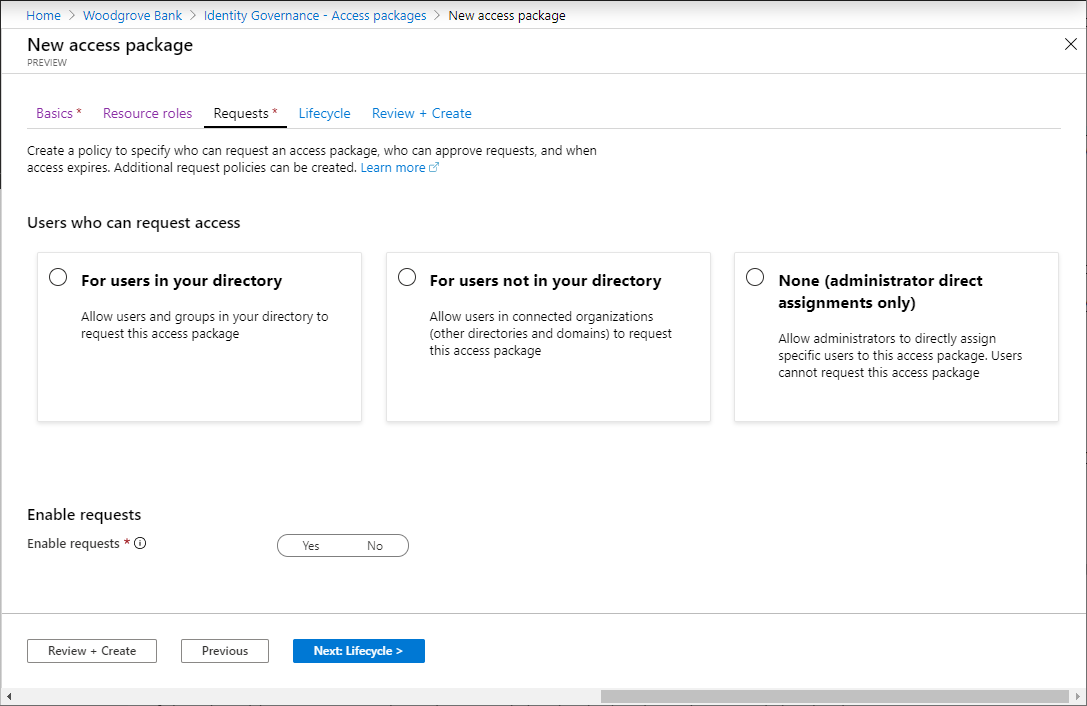
What makes this powerful is not just the packaging. It is the policy around the package. Microsoft’s access package model lets the admin define who can request access, how many approval stages apply, who the approvers are, how long the assignment lasts, and whether extension is allowed. That is the entitlement-based governance pattern enterprises have needed for agent fleets. The access is intentional, auditable, and time-bound. It is also worth being precise about the limits. Microsoft notes that agent identities and service principals cannot be added through these access packages to application roles, SAP roles, or SharePoint Online site roles, so those should not be described as supported package targets. The supported story today is group memberships, allowed Entra roles, and API permissions.
There is an even more important constraint sitting underneath that packaging model: not every role or permission can be granted to an agent in the first place. Microsoft maintains a specific list of Microsoft Entra roles allowed for agents and separately blocks a set of high-risk Microsoft Graph permissions for agent identities and blueprints, including examples such as Application.ReadWrite.All, RoleManagement.ReadWrite.All, User.ReadWrite.All, and Directory.AccessAsUser.All. The reason is straightforward and worth stating plainly. High-privilege directory roles and tenant-wide control permissions assume a human administrator exercising deliberate judgment. An autonomous or semi-autonomous agent with those privileges could delete users, alter security settings, or escalate access at machine speed. Microsoft’s design is intentionally restrictive so that agent authorization defaults to least privilege instead of turning every helpful assistant into a tiny, tireless super-admin.
Giving Agents a Desk, Not Just a Badge: Agent Users and Work IQ
Not every extension story stops with an agent identity acting like an application. Sometimes an agent needs to participate as a digital worker with user-shaped capabilities. That is where the agent user pattern becomes important. Microsoft’s agent user model gives an agent a dedicated nonhuman user account that is linked one-to-one with its parent agent identity. That user account is optional, not automatic, and should be created only when the agent truly needs to act in contexts where a user identity is required.
This distinction matters because an agent user is not just "an app with a mailbox." Microsoft documents it as a constrained user identity that receives user-type tokens, can be added to groups, can be licensed for Microsoft 365 resources, and can participate in collaboration scenarios, while still being prevented from behaving like a normal interactive human account. It cannot have passwords or passkeys, it cannot break away from its parent identity, and it cannot take on privileged admin roles. In other words, you get user-context capability without abandoning the nonhuman security model.
That opens up a useful design pattern for extending agents with Work IQ. Work IQ MCP servers give agents access to grounded Microsoft 365 context and deterministic tools across mail, calendar, Teams, SharePoint, OneDrive, Word, and user profile data. For many scenarios, delegated or On-Behalf-Of access is enough. But the agent user pattern becomes compelling when the agent must persist as a long-lived teammate rather than merely borrowing a person’s context for a moment.
Think about a few practical scenarios. A service desk agent acting as a round-the-clock digital employee might need its own mailbox, Teams presence, and membership in a support operations group so it can triage inbound issues, summarize the case history with Work IQ Mail, inspect meeting context with Work IQ Calendar, and post updates into the right Teams channel. A project coordinator agent might need to appear as a stable participant in recurring planning meetings, access collaboration spaces that are only exposed to user identities, and use Work IQ User, Calendar, and Teams to keep schedules, participant context, and follow-up actions aligned. A research or account-planning agent might use Work IQ Copilot, SharePoint, and OneDrive to gather organizational context, files, and prior conversations while retaining a persistent user-shaped identity that other systems can recognize as part of the working team.
The key point is that Agent ID governance and Agent 365 extensibility are not competing stories. They reinforce each other. Agent identities give you the control plane for lifecycle, access, and policy. Agent users give you a constrained pattern for user-centric collaboration scenarios. Work IQ gives those governed identities useful, grounded context and tools. Put together, they allow an agent to be more than a background daemon without letting it wander the tenant like a caffeinated intern with global admin. 🤪
Setting the Bouncers: Conditional Access for Agents
With provisioning and entitlement in place, the next step is to make the access decision itself more intelligent. Microsoft Entra Conditional Access for Agent ID brings that control to token acquisition by agent identities and agent users. This is where the phrase “adaptive risk evaluation before token issuance” becomes more than marketing language. It's essentially putting a bouncer at the door of your data, ensuring that merely shouting "Smoke me a kipper, I'll be back for breakfast!" isn't enough to secure an access token.
Microsoft’s documentation is explicit that Conditional Access applies when an agent identity or agent user requests a token for a resource. It does not apply when the blueprint acquires a token for Microsoft Graph to create agent identities or agent users, and it does not apply to the intermediate token exchange step itself. That nuance matters because it keeps the blog accurate and helps architects understand where enforcement actually sits. The control point is the moment an instantiated agent identity or agent user is trying to obtain access to a protected resource.

From there, Microsoft gives admins several ways to shape policy. Policies can target all agent identities, specific agents by object ID, agents grouped by blueprint, or agents selected through custom security attributes. Policies can also target all resources, all agent resources, or specific resources. Conditions include agent risk, and access controls can block. Microsoft even documents a concrete pattern for approval-aware policy design: assign custom security attributes such as an approval status to agents or blueprints, assign corresponding attributes to resources, and then use Conditional Access to block all agents except those reviewed and approved for that kind of resource.
That is an important shift. Conditional Access is no longer just a broad perimeter control for users and apps. In the Agent ID model, it becomes a way to express that a newly created or unreviewed agent should not be able to get a token to sensitive resources until it has passed the organization’s governance checkpoints. That is the practical meaning of agent-context-aware policy.
Preventing the Zombie Apocalypse: Lifecycle Automation
Once agents can be created and granted access safely, the next challenge is to make sure they do not keep that access forever. Lifecycle governance is where most identity programs prove whether they are durable, and the same is true for agent identity. A forgotten, over-permissioned agent is the IT equivalent of a dormant volcano—if left unchecked, eventually someone is going to have to say, "Everybody's dead, Dave."
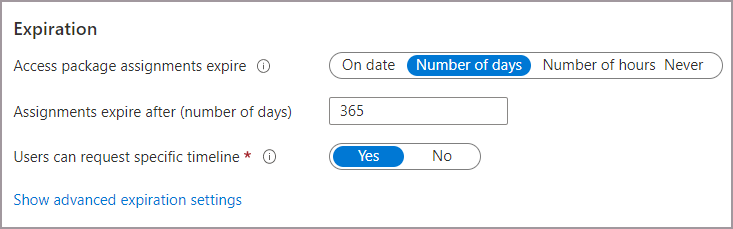
Microsoft’s guidance already provides several lifecycle levers. Access package assignments can expire automatically. Sponsors can renew them or let them lapse. Agent owners and sponsors can disable agent identities through the My Account experience. Blueprint principals can be viewed and managed in the Entra admin center, where their linked identities, permissions, owners, sponsors, audit logs, and sign-in logs are visible. Microsoft also documents that blueprint principals can be disabled, and that disabling the blueprint prevents child agent identities from authenticating. On the extreme end, a blueprint principal can be removed from a tenant, and the blueprint documentation also notes that associated identities and users should be removed before deleting the blueprint itself.
This is also the right place to bring in access reviews, but carefully. Microsoft’s agent-specific governance guidance is strongest around access packages, sponsor approvals, expiration's, and administrative actions. Microsoft’s broader access review documentation, however, makes it clear that access reviews can be used to re-certify access to groups, enterprise applications, role assignments, and access package assignments. So the most accurate way to frame lifecycle reviews for agents is this: review the groups, applications, roles, and access package assignments that agent identities depend on, and use the results to remove unneeded access automatically where the integration supports it. That keeps the lifecycle story factual while still supporting the “review, remove access, revoke, deactivate” progression.
In practical terms, a mature lifecycle motion looks like this: review the package assignments and dependent resource access on a schedule, let expired assignments revoke access automatically, disable the agent identity if the agent should stop operating, remove unnecessary assignments and memberships, and disable the blueprint principal when the whole class of agent should no longer authenticate. That is how you keep the directory from becoming a graveyard of forgotten automation.
Keeping an Eye on the Machines: Monitoring and Guardrails
The final step is to accept that governance is not complete just because an agent was onboarded correctly. Agents must remain observable, and guardrails must hold when behavior changes. When things go sideways, you need a warning system significantly more helpful than Holly simply announcing, "Emergency. There's an emergency going on." This is where Microsoft Entra ID Protection, sign-in telemetry, audit logs, and network-level controls come together.
Microsoft Entra ID Protection for agents is designed to spot behaviors that fall outside the normal baseline for an agent. The current documented detection's include unfamiliar resource access, sign-in spikes, failed access attempts, delegated sign-in on behalf of a risky user, and threat-intelligence-backed suspicious activity. Admins can investigate risky agents, confirm compromise, dismiss false positives, or disable the agent entirely. That last point is important for the requested guardrail around compromised credentials. The most accurate way to say it is not that Entra blocks “compromised credentials” directly, but that it can flag risky or confirmed-compromised agents and feed that signal into Conditional Access policies that block high-risk agents before they obtain tokens for resources.


Microsoft also provides observability through sign-in logs and audit logs. For Conditional Access troubleshooting, admins can filter sign-in events by agent type. For blueprint principals, the Entra admin center exposes linked identities, status, permissions, audit logs, and sign-in logs. Inside Microsoft Agent 365, the registry and reporting model broadens that visibility further by giving IT and security teams a unified view of agents across supported platforms.
Then there are the network guardrails. Microsoft’s current Global Secure Access documentation is most explicit for Copilot Studio agent traffic, where tenant-level baseline profiles can enforce web content filtering, threat-intelligence filtering, and file filtering once traffic is forwarded through the service. Even where those network controls are product-scoped today, the design intent is clear: agent governance is not just identity issuance and access approval, it is also safe resource boundaries. The enterprise goal is to ensure an agent cannot freely roam to any API, any connector, or any destination simply because it can technically make a call. Safe boundaries come from a combination of least privilege, resource targeting, risk-based policy, and network restriction.
Conclusion
That is why the path to success matters. Microsoft Entra Agent ID is not valuable simply because it introduces new object types. Its value comes from the sequence it enables. First, define the blueprint model so agents are categorized and provisioned consistently. Then tie each agent to accountable humans. Govern access through packages instead of ad hoc grants. Make token issuance conditional on risk and approval state. Run lifecycle processes that can renew, expire, disable, and remove what is no longer needed. Finally, monitor what agents do and enforce guardrails when behavior moves out of bounds.
For organizations trying to govern AI copilots, automation bots, and autonomous agents seriously, that sequence is much closer to an operating model than a feature checklist. It reduces attack surface. It creates a consistent baseline. It improves visibility and compliance. Most importantly, it keeps the agent conversation anchored in identity engineering rather than novelty. In the Frontier-era Microsoft Agent 365 story, Microsoft Entra Agent ID is starting to look like the control plane enterprises will need if they want agent adoption to scale without losing control of who, or what, is acting inside the tenant. 🚀
References
Microsoft Entra Agent ID documentation.
What is Microsoft Entra Agent ID?.
What is Microsoft agent identity platform.
Agent identity blueprints in Microsoft Entra Agent ID.
Create an agent identity blueprint.
Agent identities in Microsoft Entra Agent ID.
Agent users in Microsoft Entra Agent ID.
View and manage agent identity blueprints in your tenant.
Conditional Access for Agent ID (Preview).
Governing Agent Identities (Preview).
Authorization in Microsoft Entra Agent ID.
Access packages for Agent identities.
The agent's user account in Microsoft Entra Agent ID.
Prepare for an access review of users' access to an application.
Agent identity sponsor tasks in Lifecycle Workflows (Preview).
ID Protection for agents (Preview).
Overview of Microsoft Agent 365.